
Instant 3D Generation
One prompt produces a complete scene in seconds, with no modelling steps in between.
WorldGen turns a prompt or a single reference image into a 360 degree panorama, then into an explorable 3D scene you can walk through from any angle.
Built on the WorldGen research project by Ziyang Xie and the WorldGen authors.
Every clip below starts from a single prompt or a single reference image. Nothing is modelled by hand.
A vibrant coral reef teeming with fish, shafts of sunlight through clear water
A sunken castle courtyard deep underwater, drifting particles and blue light
A medieval castle on a hill during sunset, warm light on old stone
A neon cyberpunk street at night, rain-slicked asphalt and glowing signage
An abandoned industrial factory floor with light falling through broken skylights
A cosy living room with warm evening light and a wooden floor
The surface of Mars, rocky red terrain with dust in the air, photorealistic
A blocky voxel world with grass hills, trees and a small wooden hut
A snowy mountain range at golden hour above a glacial lake
A two-stage pipeline keeps the scene layout coherent while leaving you in control of the look.
One prompt produces a complete scene in seconds, with no modelling steps in between.
Start from a written description or from a single reference image you already have.
Move through the space in any direction and look up, down and behind you without holes.
The panorama stage locks the room layout, so walls, floors and ceilings stay aligned.
Take the scene away as 3D Gaussian splats for realism or a mesh for downstream tools.
Steer mood, lighting and material with prompt detail or a stylised reference image.
Write a prompt or upload a reference image, generate a panorama, then convert it into a scene you can explore.
Sign in with Google. Free credits land on your account straight away.
Describe the world, or upload one image for the scene to follow.
WorldGen renders a 360 degree panorama that fixes the layout of the scene.
Walk through the result, then export it as splats or a mesh.
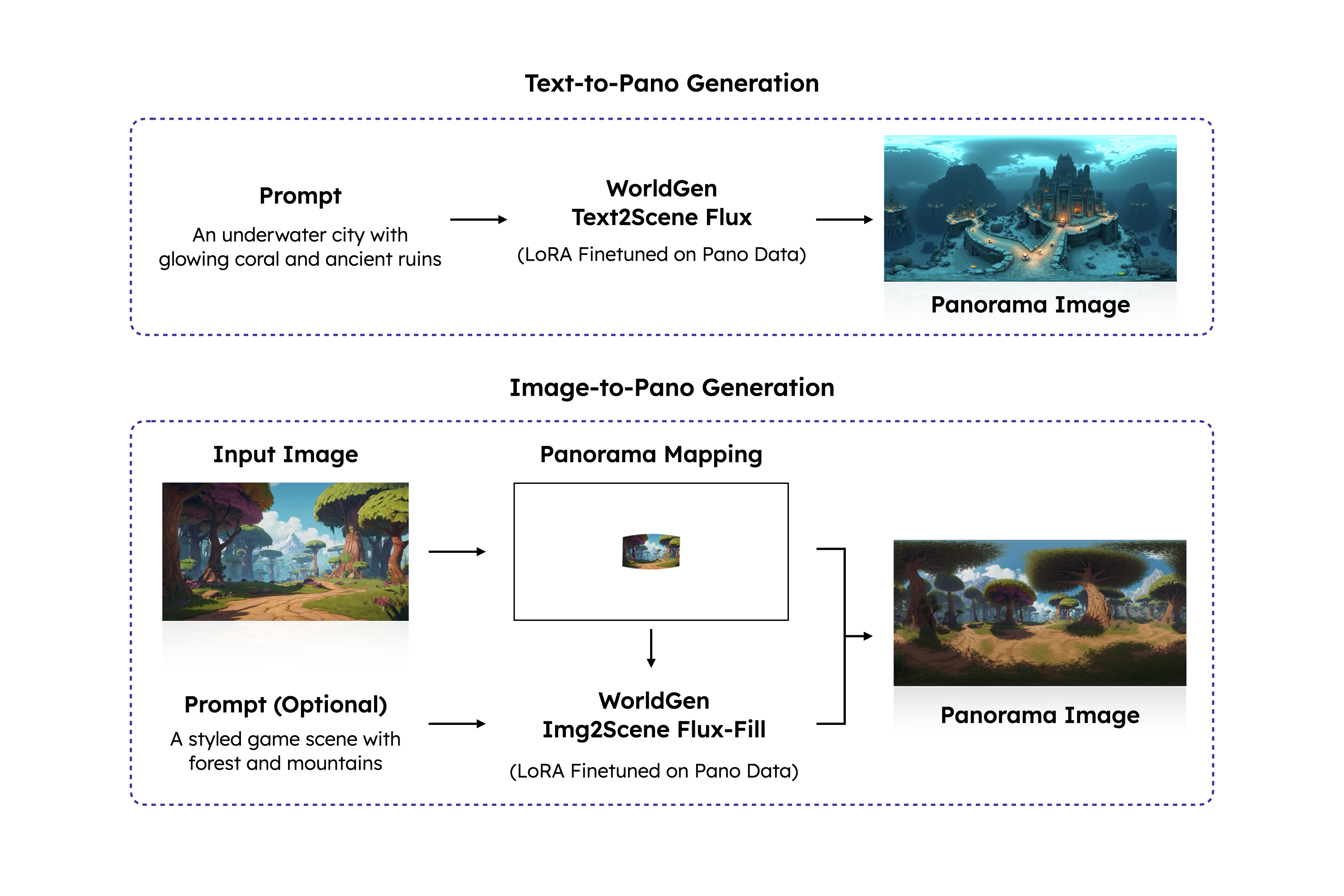
A text or image prompt is turned into a high resolution 360 degree panorama that fixes the overall layout, lighting and appearance.
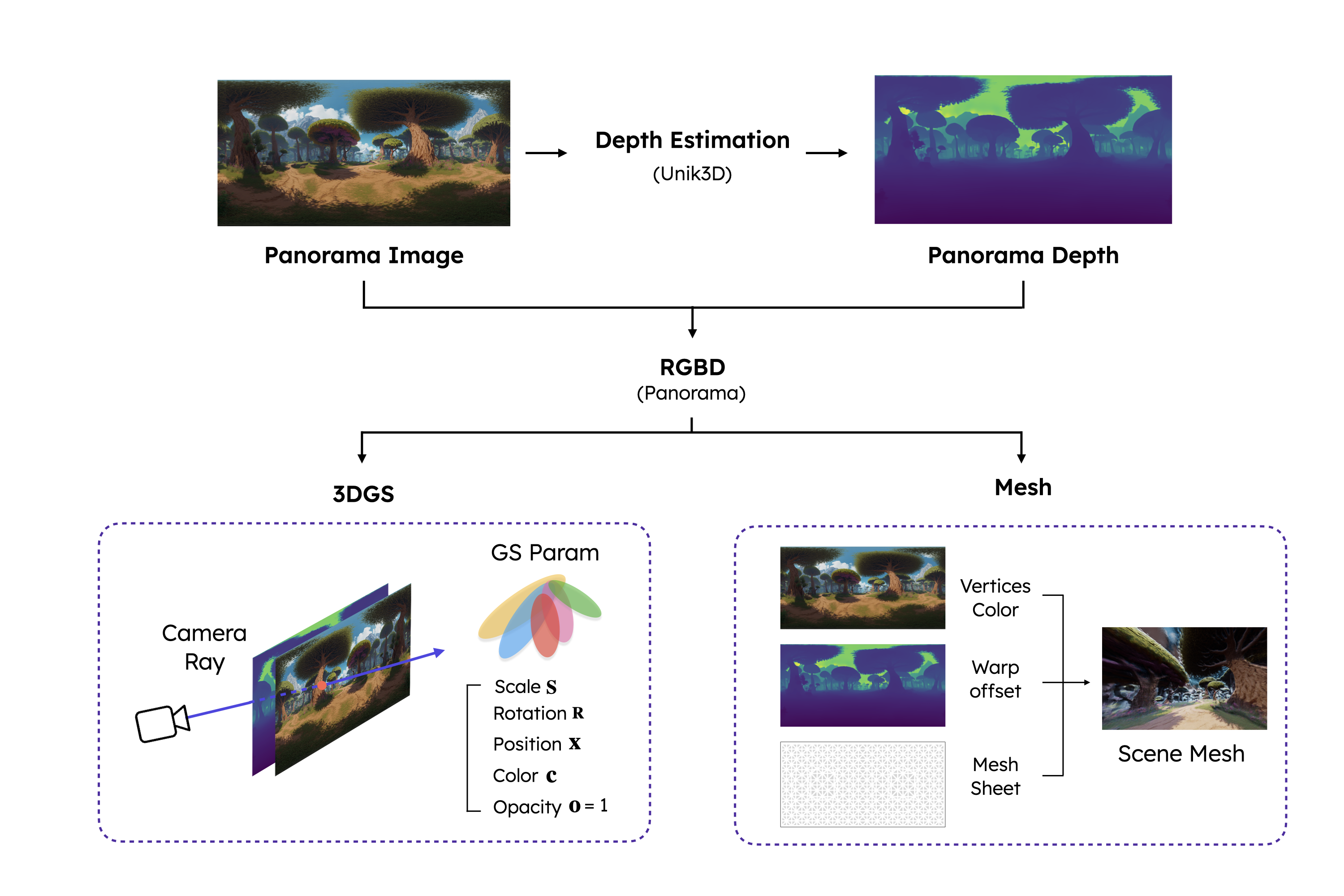
The panorama is lifted into 3D: depth estimation builds a panorama depth map, RGBD carries colour and geometry together, and the result becomes 3D Gaussian splats or a mesh.
Both routes run the same two stage pipeline. Pick the one that matches the material you already have.
Teams use generated scenes wherever a space has to be seen and moved through, not just looked at.
Block out explorable spaces and check sightlines before committing to art.
Turn a client photo or mood board into a room you can walk through together.
Show the camera where a shot lives inside the environment.
Give a listing a scene visitors can move around, not a fixed set of stills.
Rebuild historic, industrial or dangerous locations as safe walkthroughs.
Explore an idea from the inside and keep the version you like.
Three short guides: writing prompts that produce scenes, starting from a single photo, and how scene generation differs from asset generation.
WorldGen turns a written description into a 360 degree panorama and then into a scene you can walk through: no modelling, no GPU, and no export pipeline to babysit.
Text to 3D guideUpload a single reference image and WorldGen extends it into a full 360 degree environment you can explore from any angle.
Image to 3D guideThe names overlap: WorldGen is both a research pipeline and this site, while Rodin usually means asset generation. The useful question is not which is better, but which output the job needs.
WorldGen vs Rodin WorldGen guideEvery plan runs the whole pipeline: prompt or reference image in, panorama and explorable scene out. Only the monthly credit allowance changes.
For trying ideas and building your first scenes.
$19/month
For solo creators producing scenes every week.
$49/month
For teams shipping environments every day.
$99/month
For studios running many scenes in parallel.
$199/month
Credits are shared across text-to-scene and image-to-scene generation. Cancel any time.
Short answers about the model, the two stage pipeline and the way credits are used.
WorldGen is a research model that generates interactive 3D scenes from text or a single image. It first produces a 360 degree panorama and then converts that panorama into a 3D scene you can explore.
worldgen.lol is an independent third-party service that runs the WorldGen pipeline for you. It is not affiliated with, endorsed by or operated by the WorldGen research project or its authors.
Generation runs in two stages. Most scenes are ready in seconds to a couple of minutes depending on the queue and the chosen quality.
Yes. Upload one reference image and the pipeline fills in the surrounding scene, keeping the layout, materials and mood of your image.
No. You write a prompt or upload an image, and the scene arrives ready to explore. Splats and meshes can be exported if you want to keep editing elsewhere.
You can move freely in any direction and look around behind you, above and below. The panorama stage keeps the room coherent so there are no gaps at the seams.
You can take the scene away as 3D Gaussian splats when realism matters, or as a mesh when you need to edit it in a modelling tool.
Each generation consumes credits from your plan. Credits are shared between text-to-scene and image-to-scene generation and reset with each billing period.
Yes. A new account receives welcome credits, which is enough to generate your first scenes before choosing a plan.
Subscriptions are handled by Stripe, so all major cards and wallets that Stripe supports are accepted.
Yes. Subscriptions can be cancelled from your billing settings and stay active until the end of the current period.
You are responsible for the prompts and reference images you upload. Make sure you hold the rights to any image you use as a reference.
Start with a sentence or a single reference image and walk through the result in seconds.